Now, we’re gonna talk about how I did it so you can learn from my mistakes. But first watch this clip from the matrix so you can understand the vibes better.
Snap back to reality.
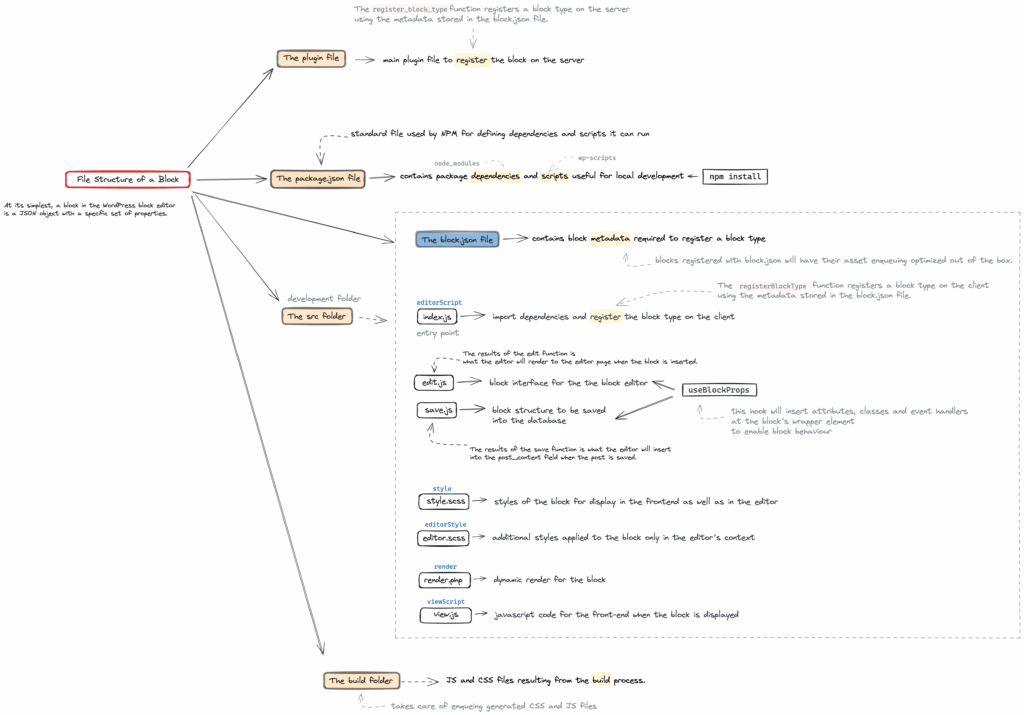
This was my first wordpress plugin so I followed this tutorial to figure out how to handle the editor and front-end. The tutorial is great if you want to build something that doesn’t use javascript at all. But a typing wordpress element requires javascript to update the text on a timed basis. So I had to dig deeper. I did find a useful structure of a wordpress plugin which I structured mine around.
The Editor
To use javascript in the react-based editor, it’s recommended to read up on useEffects and useRefs. Anytime the user updates the settings through the InspectorControls component, the useEffect gets run and the matrix typing element runs from the start.
One important thing I want to stress for those building your first plugin is to have a parent element. I added a span tag inside the paragraph tag which fixed an issue where you couldn’t edit past blocks.
<p>
   <span ref={myRef}></span>
</p>
If you’re working with useEffects I recommend looking into useRef as it can save you a little bit of work on the javascript side of finding an element and wondering when it renders.
The View
WordPress allows two options for you to view the final product through PHP or react, and either one works just fine. I tried both, and here’s my takeaway if you’re working with javascript:
Learn how to utilize wp_register_script and wp_enqueue_script to add any scripts you want accessible on the frontend. Make sure you include the current directory using __DIR__ in PHP.
An interesting feature I’ve added is one using InteractionObserver which allows you to activate a typing block only when it’s in view. It just listens for when the object comes in view and when it does it will start the animation. I’ve added it twice on this page for you to see. Pretty neat huh?
Along with creating a matrix effect, you could use this to display facts about your product in a cool way or even create a fun retro video-game feel! There are lots of possibilities.
I hope you’ve enjoyed this comprehensive guide. Check out the plugin source code and .zip via the link below.
Please feel free to ask questions in the comments or email me at me@s34n.net
Leave a Reply